On you admin dashboard -> got to => Copygen => General settings => RTl Enable / Disable
Enable and click save changes button
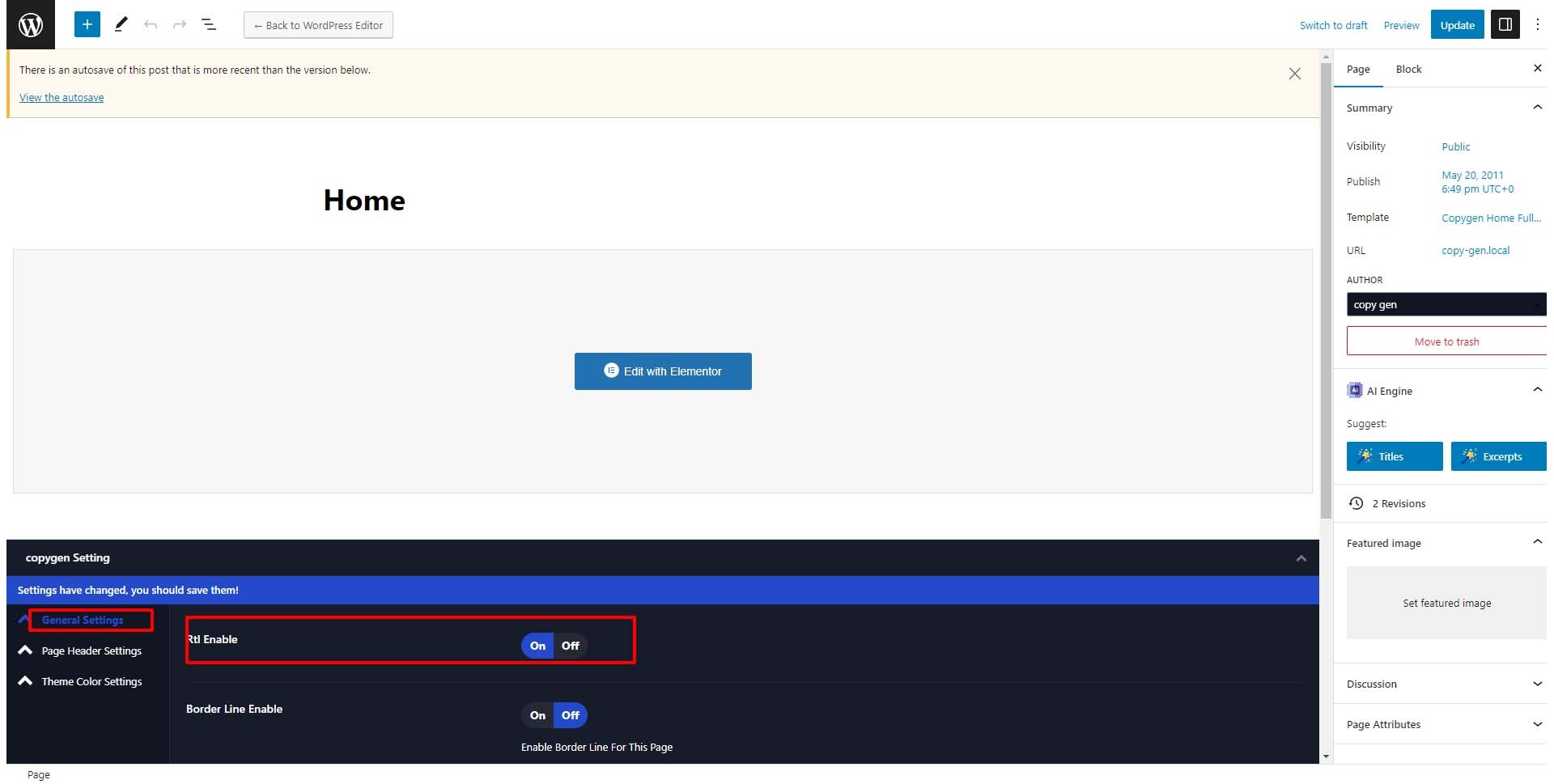
To enable RTl for particular page or post
Edit the page or post you want to change rtl
Scroll down -> general settings -> Rtl enable
Enable and click Update button
# To Enable Prelaoder and change preloader image and stle
On you admin dashboard -> got to => Copygen => General settings => Preloader Enable / Disable
Enable and click save changes button
# To Enable Back to top Option
On you admin dashboard -> got to => Copygen => General settings => Back to top Enable /Disable
Enable and click save changes button
# To Enable Page title , breadcrumb and add styling
On you admin dashboard -> got to => Copygen => Page Header settings => Page Header Enable / Disable
On Page header settings tab you can find page header alignment , Breadcrumb Enable / Disable
After enable the page title it will show styling optionn like background image and page background color page title color
# To change option panel content
On you admin dashboard -> got to => Copygen => Option panel settings => there you can change the option panel content like -> logo , description , latest post , form and contact details
On you admin dashboard -> got to => Copygen => Option panel settings => Option Panel color settings
On you admin dashboard -> got to => Copygen => Option panel settings => Search Panel settings
# To change Mobile Panel Content and Color
On you admin dashboard -> got to => Copygen => Mobile Menu Settings => there you can change the mobile panel content like -> Search Disable / Enable , contact details and social media
On you admin dashboard -> got to => Copygen => Mobile Menu settings => Mobile Menu Color Settings
# To Change settings for Blog Post
On you admin dashboard -> got to => Copygen => Blog Settings => there you can change the Blog Settings like -> Enable Excerpt and for blog single.
For Blog Post page : Excerpt , Categoty , Authour and Meta Enable Disable
For Blog Single Page : Category Enable / Disable
Tag Enable / Disable
Share Enable / Disable
Authour Details Enable / Disable
Post Navigation Enable / Disable
Related Post Enable / Disable
# To Change Theme Color for entire Site
On you admin dashboard -> got to => Copygen => Color Settings
Background Postion -> for Entire Site
Dark Colors Enable / Disable -> if enable this the site will switch to dark
Theme Colors Enable / Disable -> enablt this to change theme color
# How to Enable darkmode
On you admin dashboard -> got to => Copygen => Color Settings
Dark Colors Enable / Disable -> if enable this the site will switch to dark
# How to Change typography ?
On you admin dashboard -> got to => Copygen => Typography Settings
There you can change typography for entire site
# How to 404 Image ?
On you admin dashboard -> got to => Copygen => 404 Settings